






















Published by Nathan Ellison, Security Testing & Assurance (STA) on 25 August 2026
While conducting a penetration test on an internal application, a Security Consultant in our Security Testing and Assurance (STA) team discovered a vulnerability in the open-source Python framework that powered it – Litestar, an Asynchronous Server Gateway Interface (ASGI). ASGI frameworks allow webservers to talk to Python applications, relieving the developer from having to implement this mechanism manually. Litestar versions prior to 2.22.0 contain a vulnerability whereby injecting HTML script tags into a cookie, under certain conditions, allows a malicious user to execute a Cross-Site Scripting (XSS) attack when the page is refreshed. Such an attack can have severe consequences, including session hijacking, phishing, or website defacement. The attack requires that the target application uses HTML templating, the Litestar CSRF middleware, and hidden form fields + cookies to store CSRF tokens. We promptly reported the finding to the project maintainers via GitHub, explaining both the impact of the vulnerability and how it could potentially be weaponised. After an initial triage, a fix was released and a CVE was assigned.
The beginning
In addition to supporting our clients with their cyber security efforts, the STA practice also support each other. Many of our consultants double as software developers – where there is software, there can be vulnerabilities.
It all began in February 2026. STA maintains its own internal tooling to automate common security testing tasks. Prior to the deployment of one of these internal applications, another STA consultant was tasked with testing its security. The application in question was a Python-based web application which allowed consultants to run static code analysis tools such as bandit or opengrep on codebases and then analyse the output, all within a user-friendly interface.
While testing the target application, a rather unexpected vulnerability was discovered. To understand how it works, let’s understand how the application was built.
The inner workings
When testing web applications, it is always beneficial to have access to the source code of the application. This streamlines the entire testing process by giving consultants insight into how user input is processed and stored. Rather than having to guess and probe at the business logic, consultants can zero in on the areas of highest risk. Fortunately, we had access to the source code for our target app, so we could peel back the layers to see what lay underneath.
Templating
Templating is a very popular web development technique that allows web applications to produce dynamic web pages based on user-provided data, and it is very common to see it in use with Python-based web applications.
A template is essentially just a boilerplate HTML file that the developer writes once. The template defines the structure of a web page as well as all the styling. Within the template, the developer also defines placeholders for any dynamic data that the template should show. This could be things like the user’s name, results from a database query, or anything else. Different template engines use different syntax for defining these placeholder positions. Jinja (a popular templating engine for Python apps) defines placeholders using double curly braces, like so:
{{ user_name }}
When the template is rendered, the template engine automatically populates the user_name variable with the user’s actual name. Pretty cool right?
While looking through the templates used by the target application, we noticed something interesting on the sign up and change password pages.
Sign up
...<SNIP>...
<form class=”card card-md” method=”POST” autocomplete=”off” novalidate>
      {{ csrf_input | safe }}
      <div class=”card-body”>
            <h2 class=”card-title text-center mb-4”>Create new account</h2>
...<SNIP>...
Change password
...<SNIP>...
<form class=”card card-md” method=”POST” autocomplete=”off” novalidate>
      {{ csrf_input | safe }}
      <div class=”card-body”>
            <h2 class=”card-title text-center mb-4”>Change your password</h2>
...<SNIP>...
The {{ csrf_input | safe }} placeholder looked interesting. But what do these terms mean, and what kind of data was being inserted into that placeholder?
Safe elements
User input should always be treated as sketchy. Since the developer doesn’t know which kind of user (good or bad) will be interacting with their application, they need to treat all input as dangerous. For this reason, template engines like Jinja implement escaping by default. This turns characters that hold special meaning in HTML (such as < and >) into encoded versions of themselves. This means that if an adversary attempts to inject extra HTML tags into the template through one of the application input mechanisms, the template engine will encode them, causing the browser to render them as harmless text instead of HTML markup.
However, there will inevitably be instances where a developer does not want this escaping to occur. For this reason, template engines offer a way to mark placeholders as safe, meaning that no escaping will be applied to the data that is inserted into the placeholder. In Jinja, this is achieved using the safe keyword in the template.
# disables escaping on the “user_name” variable
{{ user_name | safe }}
The risk here is that if user_name is not properly validated and sanitised elsewhere, an adversary could set their username to an HTML tag, and the template would render it as HTML markup instead of text.
CSRF inputs
Cross-Site Request Forgery (CSRF) is a web security vulnerability where an adversary can trick a victim user’s browser into making fraudulent requests to a website to which the user is logged in. An adversary may abuse this to trick a victim user’s browser into sending a password-change request to the target website, for example, and under some conditions this will result in account takeover and lock the user out of their account. For a website or web app to be vulnerable to this, it must:
- Rely solely on HTTP cookies for tracking user sessions; and
- Not contain any unpredictable values in state-changing request types (such as for password changes).
CSRF tokens are random values that eliminate the second vulnerability condition. When a user initiates a state-changing action such as loading the password reset form, the server gives the user a random string (a CSRF token). When the user submits the form, the server will check if the CSRF token is valid. If it is, the request proceeds. If it isn’t, the request is aborted. Because the token is random, an adversary can’t complete the attack without knowing the token beforehand.
CSRF tokens can be sent to the server in a variety of ways, including:
- As an HTTP cookie (but not only a cookie).
- In an HTTP header.
- In a hidden form field.
- Any combination of the above.
Our target application placed the CSRF token into a cookie and within a hidden form field (an input tag). The input tag was the data that was being inserted into the template placeholder that we saw earlier:
{{ csrf_input | safe }}
Here is what the final tag would look like after being rendered by the template engine:
<input type="hidden" name="_csrf_token" value="278de3eeb9e0ae824b7017177090f28f45756a8c9bcbae5d6abe3824aa977168c72c12efc7ceed0b9b54862df1003db2caf07d0a26097cbdb6ae7c77ef856e86">
So now you might be wondering why a CSRF token needed to be marked as safe if it was just a random string?
Litestar
The target application was built using an open-source Python framework called Litestar. The framework offers a lot of awesome features that enable developers to get their applications up and running quickly. Most notably, for this article, it supports templating and offers its own CSRF middleware. When a template is rendered, the middleware can automatically generate a CSRF token and insert a hidden input tag into a form. The official Litestar documentation (pictured below, at the time of writing) stated that the hidden CSRF token form field had to be excluded from escaping.

Figure 1: Litestar CSRF documentation
So how does this hidden form field get created? Below is the code that generated it (at the time of writing):
csrf_token = value_or_default(ScopeState.from_scope(request.scope).csrf_token, "")

return {
      **self.context,
      "request": request,
      "csrf_input": f'<input type="hidden" name="_csrf_token"
value="{csrf_token}" />',
}
If the input tag were to be escaped by the templating engine, the HTML syntax would break and the CSRF middleware wouldn’t work properly, hence why the docs stated that it had to be marked as safe. The critical thing to note here is that the CSRF token is not sanitised anywhere. Remember that the client sends the token back to the server to complete a state-changing action. If the user has changed the token to something nefarious, it will be inserted into the template without any checks being applied.
The vulnerability
At this point, three things are clear:
- The target application utilised the Litestar CSRF middleware and sent CSRF tokens to the server using both a cookie and a hidden form field.
- CSRF tokens are untrustworthy because they are sent back to the server by the user.
- The framework powering the target application didn’t escape CSRF tokens when inserting them into templates.
Having observed that the CSRF tokens were marked as safe to disable HTML escaping in the template, we tried opening the browser developer tools. Browsing to the Storage tab revealed the CSRF token within an HTTP cookie.
Note: screenshots are from a PoC application that was created specifically for the vulnerability report.
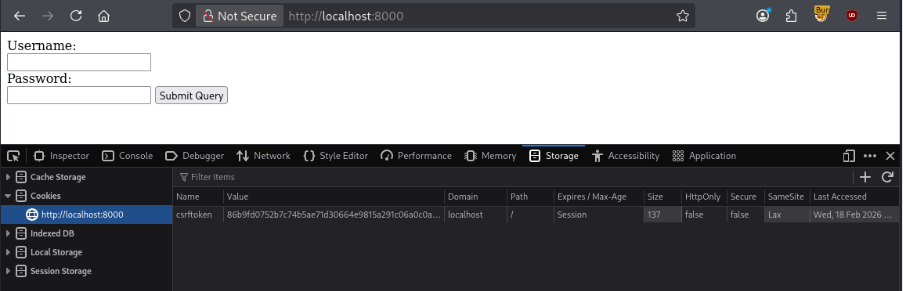
Figure 2: CSRF token as an HTTP cookie
We then changed the CSRF token to something more interesting – “><h1>HTML Injection Test</h1>.
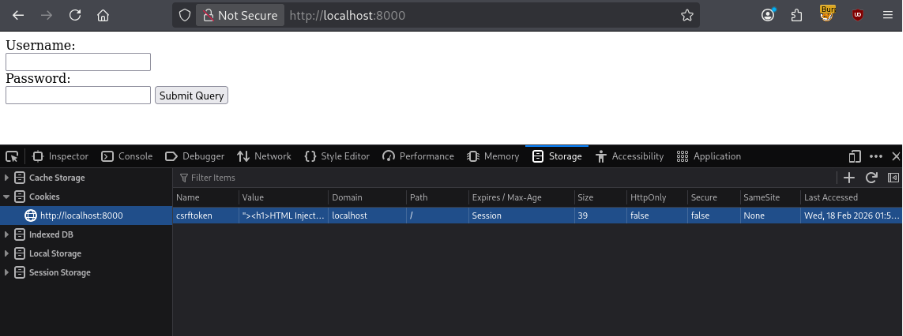
Figure 3: HTML injection payload in CSRF token cookie
We then refreshed the page and…
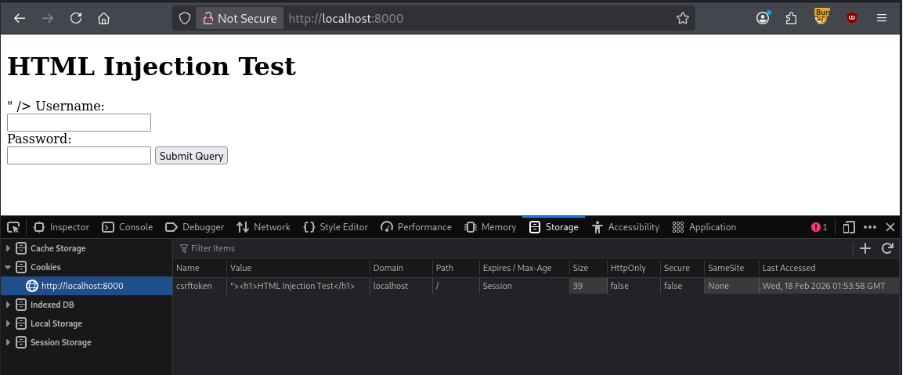
Figure 4: Successful HTML injection
…our HTML payload was injected into the page.
The exploit chain
So, we knew that we could inject HTML into the webpage, but what was the actual danger? To achieve maximum impact, there were a few conditions required.
1. Target and adversary on the same domain
HTTP cookies have an attribute labelled Domain which tells browsers which domains to send cookies to. There are a couple of things to note about this attribute:
a. Cookies with a Domain attribute of blog.example.com are sent to blog.example.com but not sent to example.com.
b. Cookies with a Domain of example.com are sent to example.com and blog.example.com.
This means that to execute a successful HTML injection attack, the vulnerable web application and the adversary’s malicious website must share a common apex domain (e.g. vulnerable.example.com and evil.example.com). This is a common deployment style, especially for applications that are deployed on internal networks.
2. Victim user tricked into visiting malicious website
As is common with many cyber attacks, it begins with the victim user visiting a malicious website. When the website loads, it gives the victim’s browser a poisoned CSRF cookie that contains the HTML payload.
3. Malicious cookie scoped to apex domain
The term apex domain refers to a domain with all the extra bits removed – such as example.com. Because the malicious cookie comes from the adversary’s site (evil.example.com), it must have its Domain attribute set to example.com to allow the victim’s browser to send it to vulnerable.example.com. The technique of giving a user a cookie scoped to the apex domain with the intent of sending it to a separate subdomain is sometimes known as cookie tossing.
4. Redirect victim user to target application
Once the user has been given the malicious cookie, they are redirected to the vulnerable web app. This can be done with a simple snippet of JavaScript which runs when the user loads the adversary’s malicious website.
setTimeout(() => {
      window.location.href=”https://vulnerable.example.com”
},2000);
5. HTML injected into page
The vulnerable web app will take the contents of the CSRF cookie and unsafely place it into the page. Because the CSRF token is not escaped, the HTML payload contained within the cookie is rendered as code instead of text.
6. Malicious script tags injected into page
With the ability to inject arbitrary HTML tags into the page, an adversary can escalate their attack from HTML injection to Cross-Site Scripting by injecting script tags into the page, causing the victim user’s browser to execute any arbitrary JavaScript written by the adversary.
The exploit proof of concept
With the full exploit chain understood, we were able to construct a full proof-of-concept attack scenario. We created our own “malicious” site to give the user the cookie and then redirect them.

Figure 5 – PoC Malicious Site
The cookie given to the user by the page above contained the following payload:
“><script>alert(“XSS on “ + document.domain)</script>
Some JavaScript on the page would then redirect the user to the target application on a different subdomain and the payload would execute when the page loaded.

Figure 6 – Execution of JavaScript Payload
The danger of XSS
Cross-Site Scripting (XSS) is one of the most dangerous web security vulnerabilities due to its sizeable potential for harm. XSS occurs when an adversary can trick an application into returning arbitrary JavaScript to the victim user’s browser, which then subsequently executes it. XSS vulnerabilities come in a few varieties, including:
- Stored XSS – the application stores the malicious JavaScript and serves it to anyone that (unknowingly) requests it.
- Reflected XSS – the application processes and reflects that malicious JavaScript back to the user in an unsafe manner.
- DOM XSS – the application passes unsanitised input to dangerous functions (entirely within the browser) which results in JavaScript execution.
In the context of the Litestar vulnerability, an adversary can escalate from HTML Injection to Reflected XSS as the poisoned CSRF token is accepted by the server and insecurely reflected back to the user.
The consequences of a successful XSS attack are vast. Some common attacks utilising XSS include:
- Modification or defacement of the website or application.
- Injection of fake login forms to trick users into submitting their credentials.
- Theft of session cookies to allow the adversary to hijack legitimate user sessions.
- Redirection to malicious websites.
- Bypassing of CSRF protection measures to perform state-changing or privileged actions.
There are many ways to carry out an XSS attack, such as simply injecting a rogue script tag like we saw earlier:
<script>alert(document.cookie)</script>
If that doesn’t work, there are more creative ways to get JavaScript to execute, such as by injecting an img tag with a non-existent src attribute.
<img src=x onerror=alert(document.cookie)>
Once the impact and exploit chain were fully understood, we proceeded to report the issue to the Litestar maintainers.
The disclosure
We immediately reported the injection vulnerability in Litestar to the project maintainers via GitHub. Fortunately, the project had a well-documented security policy which clearly explained how to report any vulnerabilities. After establishing contact, we answered any questions that the maintainers had and clarified any ambiguities. To fully demonstrate the impact of the issue, we set up and configured infrastructure, domains, and our own proof-of-concept Litestar application. Doing so allowed us to adjust our PoC payload to print the subdomain that it was running on, clearly showing that a security boundary had been crossed.
Once the report had been accepted, a fix was quickly developed and released. The fix for this issue was very simple and only required the CSRF token to be wrapped in an html.escape() call.
return {
   **self.context,
   "request": request,
   "csrf_input": f'<input type="hidden" name="_csrf_token"
value="{html.escape(csrf_token)}" />',
}
Prior to the publication of the advisory, the issue was assigned CVE-2026-48060 by GitHub.
Conclusion
This vulnerability has reminded us of a couple important lessons:
- Nothing from the client can be inherently trusted. Applications need to assume that every input is actively malicious. Every input must be validated and sanitised to ensure that it matches the expected format and doesn’t contain anything that could cause unwanted behaviour.
- Every open-source project (big or small) should have a documented security policy. Having one helps ensure that security issues can be responsibly reported on the maintainer’s terms. It also helps set expectations around how reports will be triaged and how long the process should be expected to take.
We’re also reminded that security issues can appear in the most unexpected places within an application. The presence of a CSRF token confirms that CSRF attacks aren’t going to be possible, but that doesn’t mean that the token itself isn’t a problem. Penetration testing requires not only extensive technical knowledge, but also creativity and lateral thinking. When something seems too strange to be true, check it anyway, just in case.